Personalized AI Job Assessment
Go to website: https://gbdaijobassessment.netlify.app/

Enter your job tile or function, .e.g. instead of "Manager" use "Regional Sales Manager at a manufacturing company", then click "Analyze my role" button.


After AI does it research on your entered job title or function, you will get the below output:

The top section delivers a high-level summary of your role’s AI potential. In this example, the tool evaluated 6 core tasks for the job function and identified 8 hours of weekly time savings.
The breakdown reveals exactly how AI optimizes your workflow:
-
15% Automated: Fully handled by AI systems.
-
25% Augmented: Enhanced through AI-human collaboration.
-
25% Accelerated: Speed up execution using AI tools.
-
35% Human Touchpoints: Tasks that still strictly require human judgment and oversight.
All 6 evaluated tasks are listed below. As shown in the screenshot, the highest-impact opportunity is "Generate quarterly sales pipeline forecasts." You can click on any individual task to unlock step-by-step process details.
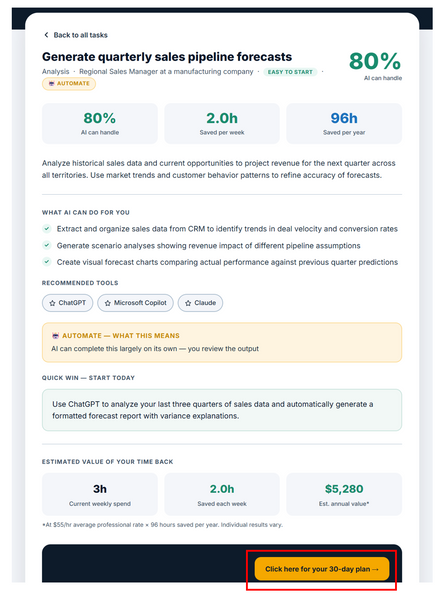
Below are details of the "Generate quarterly sales pipeline forecasts":

Explore a detailed breakdown of how AI assists with this specific task. To unlock a step-by-step implementation guide, simply click the 'Click here for your 30-day plan' button.
Below pop up screen appears to confirm the 30 day AI action for the specific task you were reviewing. In this example, when you click "Generate my 30-day plan", you will get a plan for how to deploy the "Generate quarterly sales pipeline forecasts":

Below is a structured, 4-week step-by-step plan to implement this AI solution. Click "Copy plan to clipboard" to instantly copy the text and paste it into any application, such as Word, Google Docs, or an email, to save and customize your plan.


Click the "x" on the pop-up screen, to get back to the AI task details.

Click the "Back to all tasks" to return to the AI task summary screen.

Click on any of the other tasks to understand how AI can help with those tasks.
