🛡️ AI Safety Essentials: Workshop Recap & Materials
Hi Raleigh Founded Workshop Attendees!
Thank you for joining AI Safety Essentials: Protecting Yourself, Your Data & Your Work, our hands-on session on using AI tools safely, protecting your personal and work data, and spotting AI-powered scams before they cost you.
Here's a quick recap, plus everything from the session for you to revisit anytime.
What We Covered
-
How AI actually collects data, and why "free" tools aren't always free
-
Real-world examples of AI data risks in action, from a major tech company's data leak, to a wrongful arrest caused by a facial-recognition mistake, to how everyday apps quietly connect your habits into one profile
-
"Safe or Not Safe?" a live look at real prompts people type into AI every day, and safer ways to get the same help without exposing sensitive data
-
A real AI scam walkthrough, including how AI voice-cloning can now imitate a loved one's voice from just a few seconds of audio
Your Takeaways
-
✅ Your own copy of the 5 Golden Rules for AI Safety checklist
-
✅ The Pause → Verify → Confirm habit for catching AI scams before they cost you
-
✅ The confidence to use AI at work without accidentally leaking sensitive data
Workshop Materials
Everything from the session is available below:
-
Key workshop slides
-
5 Golden Rules for AI Safety (checklist)
-
Safe vs. Not Safe scenario cards
How does AI collect its data? In one of two ways: either we type the information in directly, or we give AI access to wherever that data already lives. On top of that, AI also tracks which systems we use and what we do inside them. Why? Because all of that digital activity, put together, lets AI figure out what we're actually trying to accomplish.

From your online searches, browsing, and shopping activity, AI can predict things about you, sometimes before you'd expect. A well-known example: AI can spot patterns in what someone buys and searches for that suggest they might be pregnant, and start marketing baby products to them before they've told a single person.

Take Amazon as an example. It has stitched together a web of online services that all collect data about its customers, and AI uses that data to market things you didn't even know you wanted, until the moment they're put in front of you, and you buy.

There are real benefits to you when AI collects your data, here are a few examples.

Keep these in mind as you think about how AI can help you. Like any technology, it can be used well, or misused.

To protect your information when using AI, a few settings need to be turned on, and they're different for each tool. Below is a quick summary for Claude, ChatGPT, and Gemini, with detailed step-by-step instructions available for download.


For an added layer of protection, you can set up a private workspace where you upload your files and control exactly who can access them and whether AI trains on that data. Claude calls this a Project, ChatGPT calls this a Project, and Gemini calls this a Gem, same idea, three different names. Below are the extra security details for each, plus step-by-step instructions for setting one up.

Today, AI software companies want access to our systems, email, ERP, online storage, and more. Before you grant that access, here's what you need to consider.


The 5 Golden Rules for AI Safety
-
If you wouldn't want it on a billboard, don't type it into AI. If you wouldn't want something displayed for everyone to see, don't submit it into an AI tool.
-
Assume someone else could see it. Even with every safeguard in place, there's always a way for data to end up in front of someone else. Assume anything you share could be seen by another person.
-
AI can be wrong, verify before you trust it. AI can make mistakes, just like a person can. Always verify its answers before you act on them.
-
Slow down when something feels urgent. This is the rule for AI-enabled scams: if an interaction pressures you to act immediately, stop, take a breath, and assess the situation before doing anything.
-
Lock the front door. Your best defense is preventing unwanted access to your AI accounts in the first place. Use a password manager to generate strong, hard-to-crack passwords.

Below, you'll find real examples of unsafe AI interactions, paired with a safer way to get the same result.
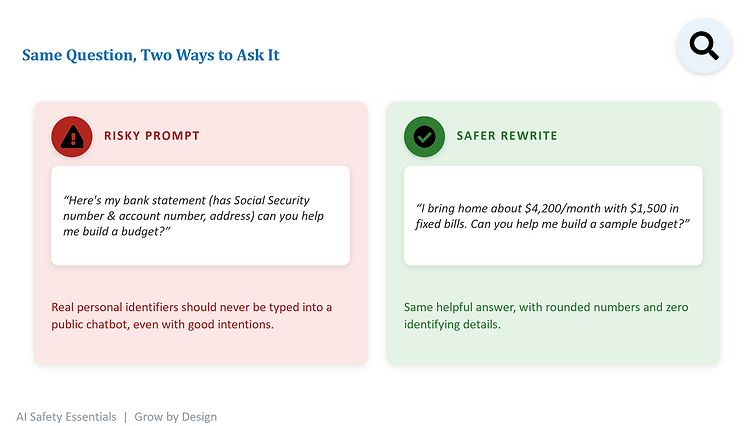


Sometimes you do need to share sensitive data with AI. Here are 4 ways to do it safely.

Unfortunately, AI has also made scammers more powerful, and scams more common. Here's how AI is fueling this rise.

Below is an example of an AI-enabled scam.

If you think you're being scammed, follow this process before acting on it.

Now let's have some fun, and show you exactly how easy it is for anyone to clone a voice with AI.

Go to: www.fish.audio and sign up for a free account. Once logged in, click on "+ Build New Voice"

You'll need at least 10 seconds of the voice you want to clone. Click "Upload" to submit an audio file, or click "Record" to record one live. Once recording completed or uploaded, click "Start Analyze".

Select what options you want for your voice clone, (make sure you check the "I confirm I have permission to create and share this voice model" button) then click "Create". In the next window, type what you want your cloned voice to say, then click "Generate Speech". Your clone voice will be created.
