
Hello All,
Thank for attending the "In 60 Minutes Build an AI Agent That Reads, Sorts & Prioritizes Your Inbox, Automatically." workshop.
Below are the key discussions from the workshop.
Follow the steps below to build an AI agent that automatically connects to your Gmail account, scans all unread emails, prioritizes and categorizes them by importance and topic, and then generates a concise summary email for quick review and action.
Note: In this process, you will be working with AI to build another AI system. As AI continues to evolve, the results and outputs you see may change over time. The purpose of these workshops is to help you learn how to effectively collaborate with AI as it improves, so while the end goal remains the same, the path to achieving it may become faster, more efficient, and more powerful as the technology advances.
Step 1: We will be using the Lovable AI app to develop the Gmail AI agent. Go to https://lovable.dev and click "Get started" to setup a new account.

Step 2: Lovable is an AI-powered development platform that can build applications for you, but it needs clear instructions on what you want to create. The best way to generate those instructions is by using an AI assistant.
Open your preferred AI tool (such as ChatGPT, Gemini, Claude, or Copilot) and enter the following prompt:
Create a detailed requirements document for an AI application that will [describe your desired solution]. Include the app's purpose, key features, user workflow, integrations, technical requirements, and success criteria. Format the response so it can be copied directly into Lovable to generate the application.
This approach helps you create a clear and detailed prompt, which significantly improves the quality of the application Lovable generates.
Below is the AI question, e.g. prompt, I used for the Gmail AI Email application:
Create a detailed requirements document for an AI application that will automatically connect and scan my gmail account for all unread emails, prioritize and categorize all the unread emails, then send a summary email of the prioritized and categorized emails. For this version, hardcode access to my gmail account. Use a free version of AI to prioritize and categorize emails. Use all free tools. Include the app's purpose, key features, user workflow, integrations, technical requirements, and success criteria. Format the response so it can be copied directly into Lovable to generate the application.

Below are the results generated from the AI prompt. As you review them, you'll notice that the output is a comprehensive requirements document for the Gmail AI application, far more detailed than most people would initially think to include.
This demonstrates one of the greatest strengths of AI: it can leverage a vast range of expertise and best practices to help answer questions and generate solutions beyond your own experience or domain knowledge. In many cases, AI will surface requirements, considerations, and features that you may not have known to ask for.
That said, AI is not perfect and can make mistakes, so always review and validate the output. In this case, since you may not know every technical detail required for the application, we'll use the AI-generated requirements as a strong starting point and then refine, modify, and enhance them directly within Lovable as we build the solution.


Step 3: In Lovable, copy and paste the requirements document above into the prompt window. These requirements will guide Lovable in designing and building your Gmail AI application, including the functionality, workflow, integrations, and technical components needed for the solution.

Step 4: Lovable will analyze your requirements and may ask follow-up questions to clarify how you want the application to work. If you're unsure how to answer a question, simply select the recommended option or the default choice already provided.
This is one of Lovable's biggest advantages, it guides you through the development process by asking the right questions to better understand your vision and requirements. You don't need coding or technical expertise to build powerful applications. You simply need to describe what you want, review the suggestions, and answer a few questions along the way. Lovable handles the technical complexity, allowing you to focus on the business problem you're trying to solve.
Below are the questions Lovable asked me:

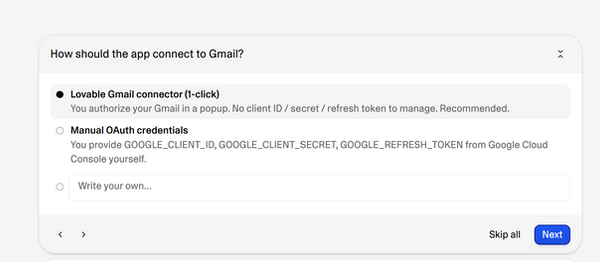

Step 5: Before building the application, Lovable will summarize your requirements and responses for review. This gives you an opportunity to confirm that it correctly understands what you want, identify any missing requirements, and make changes before development begins. Taking a few minutes to review the summary can save significant time later by ensuring the solution aligns with your expectations from the start.

Step 6: Lovable will guide you through the process of connecting the application to your Gmail account. Follow the instructions below to configure the Gmail integration and authorize secure access so the AI agent can scan, prioritize, categorize, and summarize your unread emails.
First click "New Connection".

Name the Gmail connection you are creating, ensure the email you used to setup your Lovable account is displayed, then click "Connect"

Logon to the Gmail account you want the AI application to scan emails and allow Lovable to access the below information.

Step 7: Lovable has now built your Gmail AI application, which appears on the right side of the screen, without you writing a single line of code.
Now it's time to test the application to ensure it works as expected and meets your requirements. Verify that it can connect to Gmail, scan unread emails, prioritize and categorize messages correctly, generate useful summaries, and send the summary email. If something isn't quite right, simply tell Lovable what you'd like changed, and it will update the application for you. This iterative process allows you to refine and improve the solution until it matches exactly what you envisioned.

Step 8: Click "Scan Inbox Now" to initiate a scan of the Gmail account you connected during setup. The AI agent will retrieve your unread emails, prioritize and categorize them, and generate summaries.
Review the results displayed below and verify that the scan completed successfully. Confirm that emails were retrieved, categorized appropriately, assigned the correct priority levels, and summarized accurately. If any results need improvement, provide feedback to Lovable so it can refine the application.

The scan processed 50 emails and successfully classified them, labeling 1 as Important and 49 as Low Priority. This confirms that the scan is working as expected.
I reviewed the output and confirmed the core functionality is working correctly. However, I do not like the “Recommended Next Steps” section, so let’s remove it from the application going forward.
Step 9: In my experience, the most effective way to guide Lovable is visually. Instead of only describing changes in text, I take a screenshot of what I don’t like, highlight the specific area in red, and then upload it to Lovable.
From there, I simply ask Lovable to remove or modify the highlighted section. This visual feedback makes it much easier for the AI to understand exactly what needs to change and speeds up the iteration process.
Below is the screenshot I uploaded to Lovable, highlighting the section I wanted removed.


Now the results of the email scan, does not have the "Recommended Next Steps" section.

Congratulations! you’ve just vibe coded your first AI application.
As mentioned earlier, AI continues to get smarter and will increasingly handle more of the work for you. Vibe coding is learned through action: start building, experiment, make mistakes, and improve with each iteration.
With AI as your partner, you can move from idea to working solution faster than ever, turning concepts into real applications without needing traditional coding skills.
Now think about what else you want the Gmail AI application to do, then ask Lovable to build it. Have fun!
