🚀 Become an AI-Augmented Forward Deployed Engineer
Hello Innovate Carolina Workshop Attendees!
Below is a walkthrough of a "Day in the Life" of an AI-Augmented Forward Deployed Engineer partnering with a finance leader to use AI to streamline her monthly sales revenue analysis.

Shadow the finance leader to conduct a comprehensive workflow discovery of her weekly sales analysis. The following task list outlines her standard operating cadence:

Click below to download the sample finance process tasks, which will be used in Step 2.
Step 2: Consult the "AI Efficiency Analyst"
Load the "Sample Finance Process Tasks" into an AI tool (like Gemini, Claude or ChatGPT). By providing the AI with the full context of your workflow, it can suggest specific tools and techniques to compress those time-intensive steps.
Use this prompt in your AI tool:
Act as an AI Strategy Consultant. Analyze my uploaded process map to identify the top 3 high-impact steps for AI automation. For each, provide: 1) The specific AI method (LLM, Vision, etc.), 2) Estimated % time reduction, and 3) A complexity score (1-5). Focus on reducing manual effort and errors.
Below is the screenshot of the prompt used and AI's answer (Used Gemini):


The workflow analysis highlights Data Cleaning as a high-impact, low-effort automation target, projected to save 144 minutes per cycle with a minimal complexity score of 2/5.
As an AI-Augmented FDE, capturing quick wins builds immediate momentum. Let’s target data cleaning first.
Step 3: Automate Finance Data Cleansing via AI
To demonstrate the impact of AI-enabled data cleansing, we will use the below finance data:

Load the "Sample Finance Data Cleansing" file into your AI tool and use the below prompt:
You are an AI data standardization engine. Clean the uploaded dataset using the following rules:
1. Standardize customer names (case, spacing, equivalency).
2. Normalize dates to YYYY-MM-DD.
3. Convert revenue formats:
- remove commas
- convert European formats to standard decimals
- enforce two decimal places
4. Output three tables:
A) Fully cleaned dataset
B) Summary of cleaning actions performed
Output is a download file
Below is the screenshot of the prompt used and AI's answer (Used Gemini):

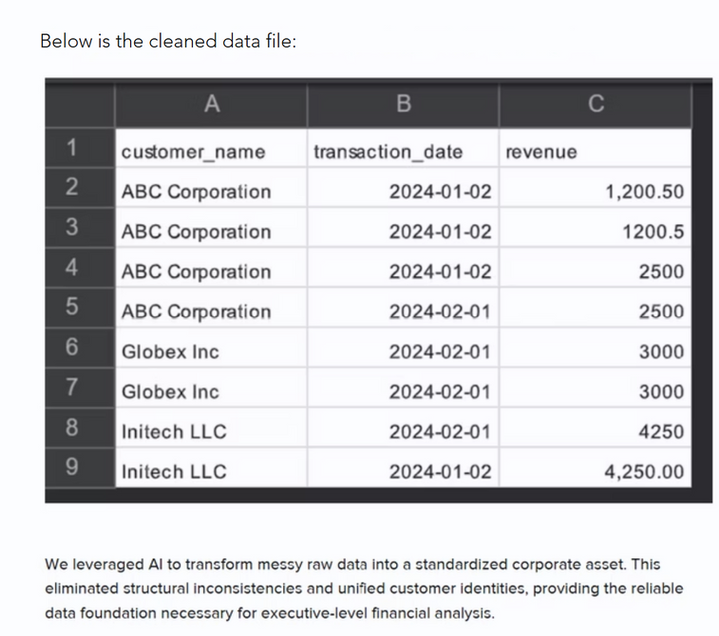
Step 4: Transform Data
Now that data standardization is complete, we can extract actionable sales intelligence. Download the cleansed monthly sales file below:
Upload the "Sample Month Sales Cleaned" file into your AI. Acting as an AI-Augmented FDE, you capture the finance leader’s core reporting objectives and formulate the following prompt:
Act as a Senior Commercial Finance & Sales Strategy Director. Analyze the cleaned monthly transaction dataset and generate an executive-ready commercial performance report covering the following five areas:
1.Revenue Concentration & Account Stratification:
1.Perform a Pareto (80/20) analysis: What percentage of accounts generate 80% of gross revenue?
2.Calculate total revenue, order volume, and Average Order Value (AOV) broken down by customer account and tier.
3.Highlight any single-customer dependency risks.
2.Time & Velocity Trends:
1.Break down revenue and order count by week (Weeks 1 through 4/5) and day-of-week.
2.Identify whether revenue is front-loaded, back-loaded, or steady, and flag any mid-month velocity surges or drop-offs.
3.Order Value Distribution & Outliers:
1.Segment transactions into size brackets (e.g., Micro <$1k, Core $1k–$5k, High-Value $5k–$10k, Enterprise >$10k).
2.Identify maximum and minimum transaction outliers and their impact on portfolio metrics.
Format the response into a downloadable excel
Below is the screenshot of AI's reply:


Review the AI output alongside the finance leader to validate analytical accuracy and reporting format. Expect initial discrepancies, conduct an iterative refinement loop by diagnosing errors, fine-tuning the prompt, and testing variations until the output meets her exact business standards.
Step 5: Business Value
Once insights are generated, they must be formatted into a deliverable, such as a slide deck, briefing email, or summary memo, to enable decision-making.
For our workflow, we will prompt the AI to transform our analytical findings directly into a structured PowerPoint presentation.
AI Prompt:
Create a PowerPoint presentation for the key insights.
Below are previews of the AI-generated slide deck::


Review the AI output alongside the finance leader to validate analytical accuracy and reporting format. Expect initial discrepancies, conduct an iterative refinement loop by diagnosing errors, fine-tuning the prompt, and testing variations until the output meets her exact business standards.
Fun with AI: Create an Avatar of Yourself
Below are instructions to create an digital clone of yourself, e.g. an avatar that looks, sounds and actions like you.
There are numerous avatar solutions available, we will use HeyGen.
Goto: Free AI Video Generator: Create Stunning Videos with AI (https://www.heygen.com/)
Sign up for a free account.

Once logged into your account, click Avatar. Then click "Clone a real person".

Choose how you want to record a 15 second video of you, so it can be used to develop your avatar.

Complete the steps to upload/complete your 15 second video. Name your avatar and click "Create Avatar".
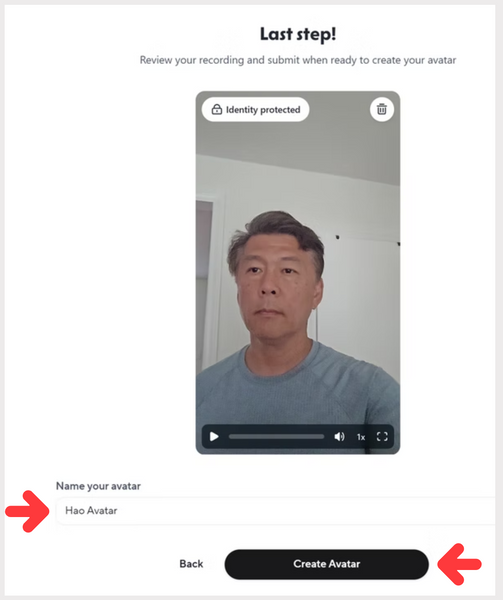
Once your avatar is create, you can select how to use your clone, e.g. what clothes it should wear, what background, etc....

I selected a clone that was in front of a microphone, perfect for a podcast.
Next I will script what I want the avatar to say, then click the "Use in video" and select "Add a script".

Add what you want the avatar to say, and click the "up" arrow.

It takes a few minutes for the avatar to generate. Check status on the left section

Once processing completes, click on the avatar to watch the clone in action!

